The full instrument panel
Attendance and workforce management features.
Explore Sentrifiq’s GPS & NFC attendance, task proof, performance reports, payroll, team controls and mobile features. Built for field teams that need clear records from the worksite to the office.
Attendance & Location
The punch is the atom of the product. Everything else is built on it being true.
Geofenced punch-in / punch-out
Draw work zones on a map — no hardware. A punch inside the zone auto-approves; outside is flagged for review. The verdict is computed server-side with PostGIS, so a modified phone can't fake a location the server didn't verify.
Offline punch queue
Punch with no network, kill the app, reopen days later — the punch syncs exactly once, guaranteed by idempotency keys enforced in the database. Nobody loses a workday to a dead spot.
Punch selfies
An optional selfie rides along with the punch and lands on the approver's review card — stored privately, shared only through short-lived signed links.
Shift-bound location trail
With location permission, route recording follows configured working days and hours. It can run before punch-in or after punch-out and stops when the recording window ends or the user signs out. Route history is available to authorised super administrators; background route points use a 90-day retention window. Read how location recording works and what is retained.
Stay time
Shift duration per person per day, derived from real punches — with honest bookkeeping: a forgotten punch-out is marked "not tracked", never counted as a 16-hour day.
One punch a day & holiday calendar
One punch-in per calendar day keeps records clean. A five-year organisation holiday calendar blocks accidental holiday punches — and holidays still count as paid days in payroll.
Live presence
Online, away, or last-seen — honest dots on the team roster. Sentrifiq says "last seen 10:42", never pretends to know more than it does.
Mock-location defense
Punches from spoofed GPS are detected and refused at the server. The geofence check on the phone is advisory feedback — the database is the referee.
The fairness rule
When GPS accuracy is worse than the geofence radius, the verdict is inconclusive — never "outside". An uncertain punch routes to a human for review; it is never auto-rejected. A weak signal is technology's fault, and we refuse to make it the worker's.
Tasks & Proof
Work that closes with evidence, not with "done ✓" in a chat thread.
Inside the task
Every requirement.
Right where the work is.
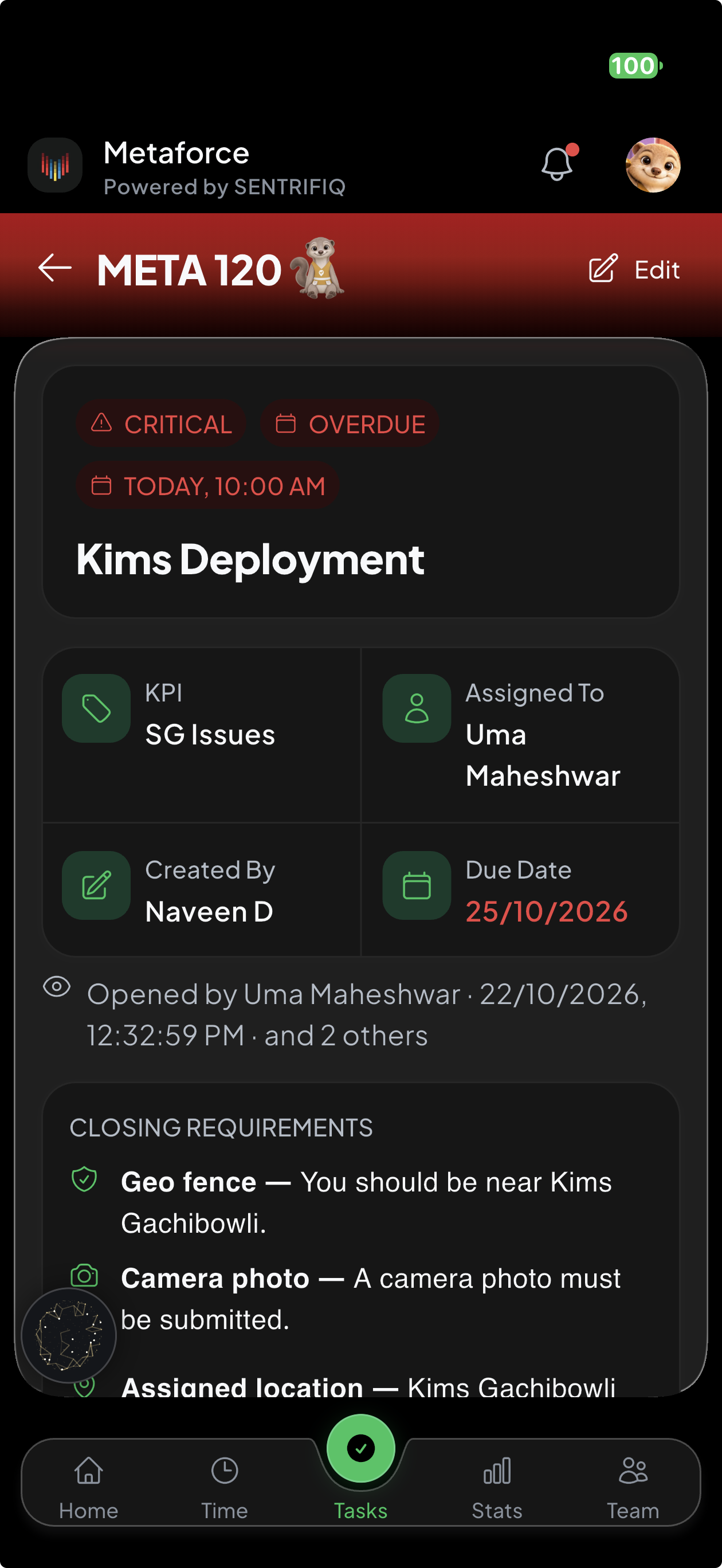
Priority, ownership, due date and closing requirements stay together. Your team can see what needs doing and the evidence needed to finish it.
- See critical and overdue work at a glance.
- Keep the assignee and task creator visible.
- Require a worksite visit and camera photo.
Priorities up to Critical
Medium, High and Critical — each worth different points in scoring, each visually unmistakable. Overdue and critical tasks announce themselves; nothing important hides in a list.
Closing requirements
The manager decides what "done" means per task: a geotagged camera photo, presence inside the work zone, a numeric target, or nothing at all. The server enforces it — a required proof can't be skipped from any client.
Geo-stamped closures
Coordinates burn into the proof photo and travel as structured data. Closing inside the zone completes the task; closing outside raises a sign-off for the owner to decide — with the evidence attached.
Photo, voice & file proof
Up to five camera photos per closure, voice notes, documents — compressed on-device, stored privately, viewable in-app by exactly the people entitled to see them.
Mark as Blocked
Can't finish because you are waiting on someone in your organisation? Mark it blocked and name them — they're notified, and so is leadership. A blocked task stays visible work, never a private excuse note.
Progress updates & audit trail
Notes, audio and photos along the way, plus every status change stamped with who and when. A disputed closure is reconstructed from the trail, not from memory.
Assign many at once
Tick three people, and three independent tasks are created — each with its own dates, its own proof, its own score. Each person has a separate task record.
Drafts that survive
Started writing a task and had to step away? The draft persists on-device for 24 hours, per user, and clears when you submit the task. If iOS closes the app in the background, your draft is still there.
Scoring & Reports
Numbers a manager can act on — and a worker can audit.
Weighted KPI scoring
Define the KPIs your business actually runs on and weight them out of 100. Every score is a weighted average of real task performance — never a number synthesised from dimensions nobody configured.
On-time earns, late costs
Deadlines are to the minute. Finishing on time earns full points; finishing late — or abandoning — costs them, so walking away never beats finishing late. Owners can grant late credit back, case by case.
Leaderboards & trends
Team standings per period with per-KPI columns and four-period trend lines. "No data" shows as a dash — never as a zero — because "never measured" and "failed" are different facts.
The score ledger
Every score expands into a per-task ledger: Early +2/2 · Late −2 · 1/2 granted. When a score drops, the reason is a list you can read, not a mystery.
Completion rate
On-time closures over assigned work, per person and for the whole team — a plain count ratio beside the weighted score, each labelled for what it is.
CSV exports
Reports, attendance and payroll export as properly escaped CSV, generated on the server — the same numbers the screens show, ready for your accountant.
Payroll
From verified punches to a monthly figure — no spreadsheet in between.
Pay from real attendance
day rate = salary ÷ days in month. Verified worked days plus unworked holidays make the payable count. Computed on the server, with a day-by-day drill-down that always agrees with its own total.
Salaries the owner alone can see
Salary lives in its own table with owner-only access enforced by the database on every operation — not by hiding a screen. Verified against live infrastructure, not assumed.
Org holidays, paid right
A holiday calendar managed by the organisation’s owner, plus national holidays built in. A holiday counts as paid unless it was already worked — one rule, applied everywhere.
Owner-only payroll export
The month's payroll as a server-generated CSV — payable days, day rates and totals per member, produced by the same function the screens read.
Team & Security
Access control enforced where it can't be bypassed: in the database.
Five roles, server-enforced
Owner, admin, manager, assistant manager, employee. Every privileged action is checked in the database — a role rule is never just a hidden button, and an admin can't promote themselves.
Tenant isolation on every table
Row-level security separates every organisation's data with no exceptions, verified by cross-org tests. Your attendance, locations and salaries are structurally unreadable to anyone else.
One device per user
An account binds to the first phone it signs in on; a second device is refused until the owner resets it. Buddy-punching from a friend's phone stops being possible.
Screenshot control
The owner decides, per role, who may capture screens. Android blocks captures outright; iOS blanks the app in the switcher and screen recordings — with the platform's real limits stated honestly.
Biometric app lock
Face ID or fingerprint gates the app on launch. No credentials are ever written to disk for it — it locks the session the platform already protects.
Append-only audit log
Every consequential change is recorded by database triggers, and the application can neither edit nor delete an entry — enforced by revoked permissions, not by policy documents.
Lock & remove members
Locking a member blocks sign-in and drops their open session at once. Removing one frees their phone number while every record they created stays readable — history is never the price of an offboarding.
Phone-number sign-in, admin-created
No self-signup, no email invites. An admin creates each member; they sign in with their phone number the same day. Onboarding a new hire takes one form.
Platform
The unglamorous engineering that makes everything above dependable.
iOS & Android, phone & tablet
One product across both platforms, from a field worker's phone to the office iPad — same data, role-appropriate screens.
Offline-first where it counts
Punches and task closures queue on-device and sync idempotently. Screens with cached data show the cache with an honest offline banner — never a blank error page.
IST-native timekeeping
Every timestamp in the product tells business time — punch times, deadlines and scores are consistent no matter what timezone a device wanders into.
Light & dark, chosen by the user
A light theme tuned for direct sunlight — where field work happens — and a dark theme for dawn shifts and warehouses. The user picks; the choice persists.
A sense of touch
Real haptic feedback on the gestures that matter — the swipe threshold, the confirmed punch, the destructive action — tuned for one-handed use in daylight glare.
In-app notifications & approvals
Flagged punches, sign-offs, blockers and nudges land in one bell, updated live, deep-linked to the exact item — and cleared when the item is decided.
Why need us
The box by the gate, the register, or proof.
Most field teams track attendance one of three ways. Here is what each one can actually tell you at the end of the month.
| Question | Sentrifiq | Biometric box | Spreadsheet / register |
|---|---|---|---|
| What you need to buy | Nothing. The phones your team already carries. | A machine for every entrance, plus installation and upkeep. | A notebook or an Excel file. |
| Staff on routes & remote sites | Punch at any work zone you draw on the map. | Only where a box is installed. | Phoned in or filled in later, on trust. |
| Proof they were on site | GPS checked on the server against the real zone, with a selfie. | Proves they reached the gate, not the work site. | None. A name and a time someone wrote down. |
| Buddy-punching | Blocked. One account per phone; a friend's phone is refused. | Hard to fake a fingerprint at the gate. | Anyone can sign for anyone. |
| When the reading fails | Weak GPS goes to a manager's review. It never docks a day's pay. | Worn or dusty fingers don't scan, so the punch doesn't happen. | Nothing fails, because nothing is checked. |
| Tasks & proof of work | Closures with geotagged photos, a full trail and KPI scores. | Attendance only. | Lost in WhatsApp threads. |
| Payroll | Calculated from verified days and exported as CSV. | Export the logs, then work it out in a spreadsheet. | Counted by hand at month end. |
| Can records be changed later? | Every change goes into an append-only audit log. | Depends on the vendor and who holds the admin login. | By anyone holding the pen. |
The biometric and register columns describe typical setups. Individual products differ.
Payroll leakage
What is buddy-punching costing you?
When attendance runs on a register or on trust, you end up paying for some days that were never worked. Enter your numbers to see what that adds up to.
staff × average salary × leak rate = ₹ lost each month
See it on your own sites.
A working pilot with your zones, your team and your KPIs — in under a week.